Easy shortcode integration
Drop the shortcode into WordPress content wherever shortcodes are supported.
This plugin helps WordPress site owners add a simple body mass index calculator to posts, pages, and landing pages without building a calculator from scratch. It is designed for shortcode-based setup, responsive layouts, and clear BMI output that fits content-driven health, fitness, and wellness websites.
It includes metric and imperial units, custom color settings, FAQ and calculator schema support, and live BMI result updates with accessible output.
[bodybmca_bmi_calculator]
A BMI calculator plugin for WordPress is useful when you want to publish interactive health content without building a calculator from scratch. This plugin fits health blogs, fitness websites, wellness coaches, nutrition sites, clinics, personal trainer pages, and educational websites that want a simple body mass index tool visitors can use in place.
Interactive tools often improve engagement because visitors can do something useful on the page instead of only reading static content. A short calculator flow can support articles, lead generation pages, service pages, and practical guides. If you want to compare the plugin with the browser version first, view the online BMI calculator or browse the wider free tools hub.
The positioning here should stay informational. BMI is a general screening measurement, not a medical diagnosis, and this plugin is best presented as a lightweight educational calculator for websites that want practical utility without overclaiming health outcomes.
The plugin is built around a simple shortcode, a clean calculator layout, and the settings most website owners actually need.
Drop the shortcode into WordPress content wherever shortcodes are supported.
Use centimeters and kilograms or feet, inches, and pounds.
You can adjust the main colors from the WordPress admin area to better match your site.
The calculator fits cleanly into phone, tablet, and desktop layouts.
It keeps the frontend simple and does not depend on heavy third-party libraries.
Visitors get a live BMI result with a category label that is easy to read at a glance.
It fits content pages, service pages, and campaign landing pages that need an interactive block.
It supports FAQ schema and calculator schema for sites that want stronger structured SEO markup.
Copy one of these shortcodes and paste it into a WordPress post, page, or reusable block.
[bodybmca_bmi_calculator]
Use this if you want the standard calculator with the default plugin settings.
[bodybmca_bmi_calculator unit="metric"]
Use this when you want the calculator to open in metric mode by default.
[bodybmca_bmi_calculator unit="imperial"]
Use this when your audience is more likely to enter height and weight in imperial units.
After adding the shortcode, preview the page to confirm the calculator appears correctly with your theme.
Metric mode uses centimeters and kilograms, while imperial mode uses feet, inches, and pounds. That makes the plugin practical for international audiences and for sites that publish content for both US and non-US visitors. If you want to see the calculation flow before installing anything, the online BMI calculator shows the same kind of user intent this plugin is designed to support.
You can change the calculator colors to better match your site branding. There is support for admin color settings, and there is also a `primary_color` shortcode option if you want more control on specific pages.
Because styling needs vary by theme, you can also layer theme CSS on top of the plugin output when finer control is needed. This keeps the default setup simple while leaving room for brand alignment on more polished landing pages.
This page includes structured data for the plugin landing page itself, including `FAQPage`, `BreadcrumbList`, `WebPage`, and `SoftwareApplication` JSON-LD. The plugin can also support FAQ and calculator schema, which is helpful for sites that want clearer structured markup around the tool.
Schema should support clarity rather than hype. It helps search engines understand what the page and software are, but it should not be used to imply medical authority, ratings, or product marketplace availability that the project does not actually have.
These screenshots show the main plugin views: the metric calculator, the imperial calculator, and the admin settings area.
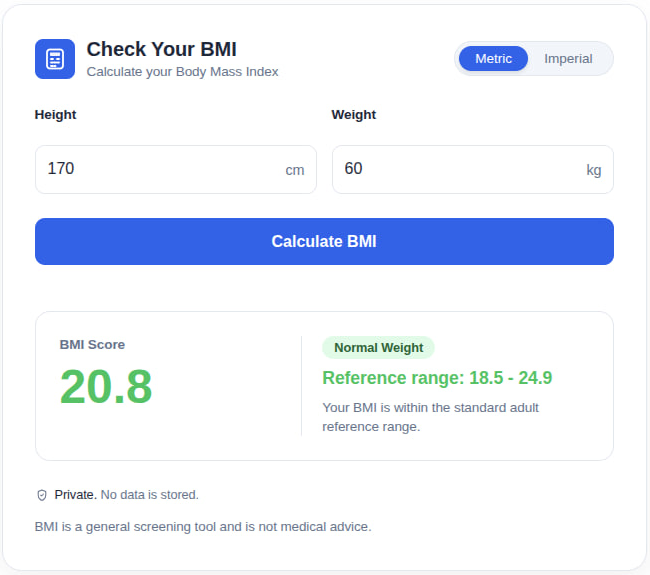
A preview of the metric version with centimeters, kilograms, and a completed BMI result.
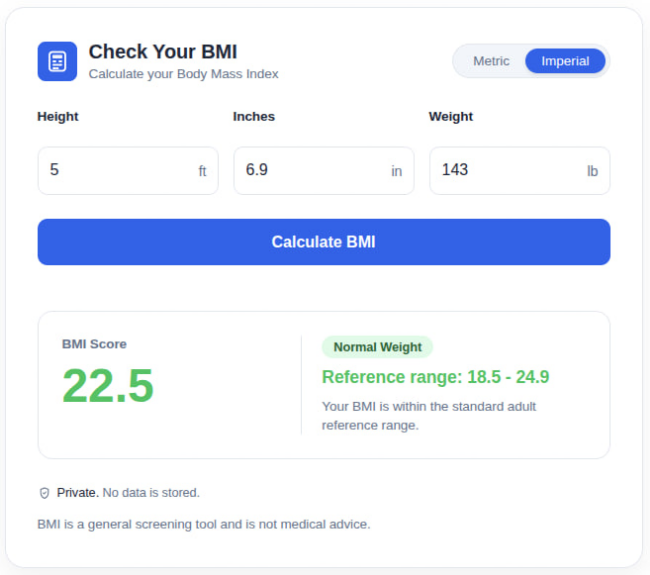
A preview of the imperial version with feet, inches, pounds, and the BMI output.
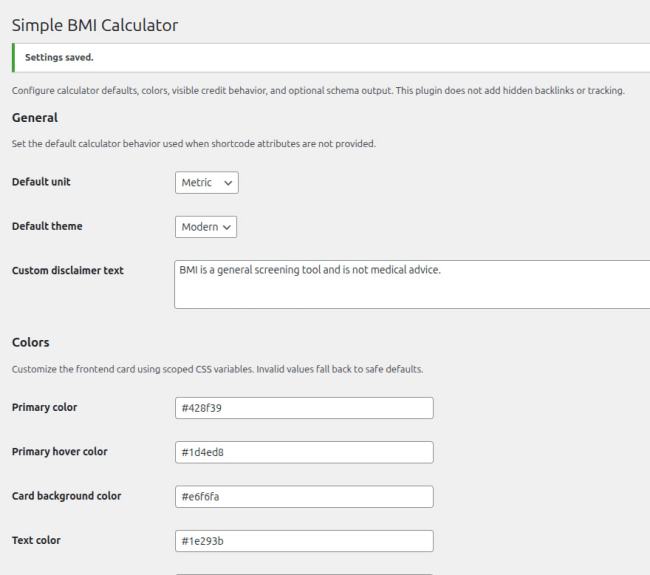
The settings area where site owners can manage display options and plugin behavior.
trunk folder.trunk folder.trunk folder.[bodybmca_bmi_calculator].
Do not upload the full GitHub repository ZIP if WordPress cannot install it. The installable plugin files are inside the trunk folder. For the easiest installation, use a release ZIP if one is available on the GitHub Releases page.
If WordPress says the plugin package could not be installed, check that your ZIP file contains the plugin files directly, not an extra parent folder with assets and trunk.
Yes. The plugin is free to download from GitHub.
Download and activate the plugin, then place the BMI calculator shortcode inside a WordPress post or page.
Yes. The plugin supports metric BMI calculation with centimeters and kilograms, plus imperial BMI calculation with feet, inches, and pounds.
Yes. The plugin README describes custom color settings in the WordPress admin area, and you can also refine styling further with your theme CSS if needed.
No. BMI is a general screening measurement and should not replace professional medical advice.
Yes. It is suitable for health blogs, fitness websites, nutrition resources, wellness sites, and educational pages.
If the ZIP contains the full repository with assets and trunk folders, WordPress may not install it directly. Open the trunk folder and create a ZIP from the plugin files inside it, or use a ready-made release ZIP if available.
The plugin is available on GitHub at https://github.com/bodymetriccalculator/wordpress-bmi-calculator.